Friday, January 21, 2011

Complex Rigging pt.2 - Skin That Sucker!

In the last post, i created a fairly complex parametric mass to use as a rig.  This week I'll look at using that rig to generate a changeable and (hopefully) graceful skin.

First i take my mass family that i generated last week:

Next I'll select a one of the vertically oriented faces and divide the surface.  I TURN OFF THE HORIZONTAL LINES because they will only trip me up on the next couple of steps.

Next I go to the SURFACE REPRESENTATION options to turn NODE VISIBILITY ON.

Now my surface has a nice node at the top and bottom edge of every division.  This is the part that won't work right if horizontal lines are still on.

After giving the same treatment to the inside surface, I start linking the points using the curve tool in 3D Snapping mode.

Working my way around and then hiding the rig form, I end up with all these reference lines:

Which i can start stitching together.  For some reason REVIT wouldn't let me make half the form at one shot.  I used a quarter of the form in this example, but you can go as far as ONE LESS THAN HALF the shape...i don't get it...

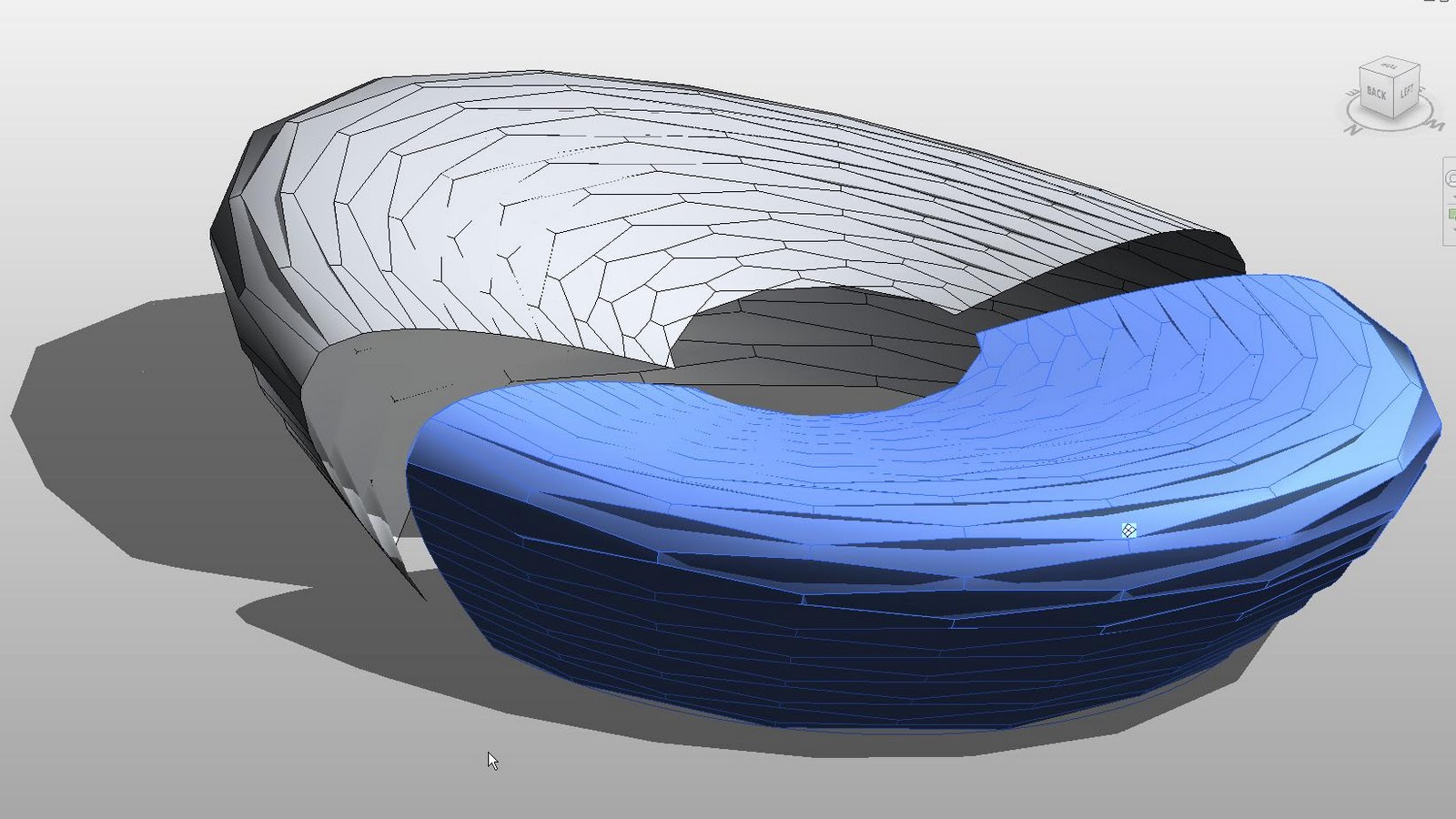
Applying a surface patterns to the new skin gives me:

Neat!  And now, I have curvy skin that will respond to the parameters of my rig:
I used a pretty benign skin pattern here, but these are some examples of flexing different CURTAIN PANEL PATTERNS on the skin:
Some great comments on last weeks post.  I love it when readers sound off!

On the topic of accuracy, I want to point to this Wikipedia page on "Accuracy" and "Precision".  Its a fun semantic argument indeed.

Just as well, I think its worth noting that we are dealing with the CONCEPTUAL Massing Environment, not the FINISHED FORM, CONSTRUCTION & MANUFACTURING ACCURATE Massing Environment.  There is a pretty wide distance between the 2 and REVIT, on the whole, can arguably cover alot of that ground, but I haven't found a tool yet that can cover ALL of it.
There's more in the pipeline on this....

Tuesday, January 11, 2011

Complex Rigging and Built Up Forms pt.1

I just love talking with people at AU who want to give me their sob story about some young hot-rod architecture intern who came in and made a bunch of great forms in Rhino, and then sent them into 3dMAX and morphed them, and now they need to recreate these forms in Revit and can't figure out how to do it and waahh waahh...U CAN"T DO THAT IN REVIT.

There's certainly a deeper question of 'Why haven't the tools in the conceptual massing editor been picked up by students' but that's way far beyond the scope of my blog.  What i am interested in is seeing how far I can push form generation with the tools i have.

There is a fellow i work with.  Very talented young man.  He is working in Digital Projects.  And just from looking over his shoulder occasionally, i see his process involves a lot of stacking and interlinking of parametric elements.  Its like a pyramid that slowly builds upwards.  It doesn't seem too different from how i think about form generation in Revit.

With that in mind, I wanted to start looking at how I could build some interesting forms by creating more complex rigs, and then building upon them.

I want to start here:


Ambitious?  Maybe.  However, I am not interested in recreating the Bird's Nest.  Hell no....though it is a very compelling form, one of these white elephants is enough....I am after the underlying geometry that makes this form possible...which is an oval shaped cone with a saddle shaped top...or at least that's where the affair starts!

So where to begin?  How about a pair of ovals like these.  I'll link the dimensions of the top oval to the bottom by sticking in a variable to control the incline angle.


To get the saddle shape at the top, I'll have to generate a void form to cut the initial oval-cone.  It won't quite be a toroid, but the cutting surface will come close.  First i have to develop a curve for the void form to sweep along.


The lengths of this curve are linked to the dimensions of the oval-cone.


Next I'll generate the void form using a bunch of dimensioned reference points placed at the ends of my sweeping curve.


And then i have 2 masses that look like this


change the cutting mass to a void, add an oval to cut a hole in the middle and bang!


With a little adjusting of the parameters, it gets pretty close to the basic mass of the bird's nest.


This is the list of the parameters:


This is the mass file:

SADDLE ENVELOPE RIG.RFA

This ought to be fun to play with until the NDA on the new release expires...

Monday, January 3, 2011

Stair Planning Tool Version 2.0

Lets face it, the stair tool in REVIT is quite cool, but when it comes to actually planning stairs it a bit less helpful than we would hope.

I did a post last year lamenting the situation and how i got around the problem by making a silly little 2d/3d rig to help me plan stairs....see it here.

In November, i had the honor of joining Kelly Cone and Jason Grant to put on a rockin' class at AU called FUZZY MATH ESSENTIALS. If you missed it...well...don't be a putz and come to AU next year.

During the class, Jason proved exactly what kind of over-achiever he is by presenting an insanely detailed stair family that was used on a project in his office....as an extension of that presentation, Jason has offered up a REALLY AWESOME FULLY 3d STAIR PLANNING FAMILY!

Revit Stair Planning Family from Jason Grant on Vimeo.


Go see his post on the topic and download that sucker if you want it!

Thursday, December 23, 2010

Lady GaGa Christmas

Ho Ho Ho....

Captain Hippo-Lady Gaga's Christmas Album from Captain Hippo on Vimeo.


BIMTrouble Maker Global Ministries is closed until 2011....

Saturday, December 11, 2010

Tron Cometh....

oh yeah...now i'm excited...

Monday, December 6, 2010

Notes from AU

This was the highlight of the week, bar none.  John D. Rockefeller meets Dr.Evil...

Followed closely by the special screening of a clip from the upcoming TRON film.  6000+ CAD Geeks in one place, I think they nailed the target audience.

And speaking of getting nailed, when I told my girlfriend bout the male/female ratio at this thing, she said next year she would send some of her single friends over to cruise for guys.

At one point I was chatting with Carl Bass, and he did tell me about the ADSK secret prize…a free one-year subscription if you can prove that you hooked up at AU.  Seriously, has anyone EVER scored at this event?

I really liked having the event at Mandalay Bay.  The meeting room levels at Venetian always felt too small, or my a55 has gotten way too big from doing nothing but pumping CAD over the years.

Robert Manna’s Baby Picture on his AU Class professor page was priceless.  I can’t believe they let him get on the plane by himself….let alone teach a class.  Congrats on the birth of number one.  Glad you took the time to come!

While I'm doing shout outs, I finally got to meet Zach Khron...If Shaggy from Scooby Doo had listened to more punk rock and went to MIT, I think he would be doing the Buildz blog too...

Revit Gunslinger….Wait, u mean I have convinced these guys that I know what I’m doing?  But it was very cool to meet some of the hardworking staff that put out Revit.  It was great to help test out next years release and I hope I can continue to be involved in the future.

Ran into Carl Bass a couple of times through out the event.  Very Nice guy.  Very approachable.  He also got a kick out of the Emiliy Pilloton from Studio H who stood up on the main stage and repeatedly said “CORN-HOLE” during the opening keynote.  A full write up of the opening keynote can be found here, Core77 did a bang up job writing about the event

The exhibit hall was cool.  The Tesla Sedan from Tuesday morning was in there for people to drool on up close.  You could have your head scanned and get a model made of it.  You could sit on Carl’s Stone bench…Some other nice exhibit pieces.

The vendors could be summed up as:
  • BIM in ‘The Cloud’
  • Win a free iPad
  • Hot 3d printer sales chick who couldn’t answer questions, but sure draws a crowd. ( But i think she was there last year too....)

I took part in my first teaching presentation with Jason Grant and Kelly Cone.  We kicked ass according to the reviews:
  • One of the best of the best at AU!
  • Basically, due to the presenters, this class is the highlight of the entire AU 2010 conference for me!
  • Best AU Session this Year. Congrats on a Job well Done!
  • By following the simple steps from this presentation, I lost fifteen pounds, doubled my income, and became a better wife and mother!  Thanks BIMTroublemaker!

Lets do it again next year!  Yee haw!

Saturday, November 27, 2010

Curtain Panel Truss Applied to Other Forms

These are images of some additional messing around i did with the Panel Truss Idea.  I think it it starts to bust through the "You Can't Do That in Revit" Glass Ceiling.  Only limit is our imaginations right?  But first, one more plug....


Come see me, THE BIM TROUBLEMAKER, at AU 2010.  Myself and 2 other VERY talented and experienced Revit users will be presenting the course:

FUZZY MATH ESSENTIALS FOR REVIT FAMILY BUILDERS
Course number AB327-4  Wedensday after lunch

If you aspire to be a family building bad-ass, don't miss this class....seriously!
When David B. from Do U Revit taught this course in 2008, he turned me into the troublemaker I am.  Hope to see YOU there!

And now...more truss panel monkey business....

Tower/Column Form
The horizontal divisions were created using DIVIDE by INTERSECTION

Wavy Surface


Mobius Truss


and now...onwards to Vegas....