Saturday, November 27, 2010

Curtain Panel Truss Applied to Other Forms

These are images of some additional messing around i did with the Panel Truss Idea.  I think it it starts to bust through the "You Can't Do That in Revit" Glass Ceiling.  Only limit is our imaginations right?  But first, one more plug....


Come see me, THE BIM TROUBLEMAKER, at AU 2010.  Myself and 2 other VERY talented and experienced Revit users will be presenting the course:

FUZZY MATH ESSENTIALS FOR REVIT FAMILY BUILDERS
Course number AB327-4  Wedensday after lunch

If you aspire to be a family building bad-ass, don't miss this class....seriously!
When David B. from Do U Revit taught this course in 2008, he turned me into the troublemaker I am.  Hope to see YOU there!

And now...more truss panel monkey business....

Tower/Column Form
The horizontal divisions were created using DIVIDE by INTERSECTION

Wavy Surface


Mobius Truss


and now...onwards to Vegas....

Saturday, November 20, 2010

Parametric Trusses via Curtain Panels 02: Arch Trusses

Continuing on from my last entry, i wanted to push the idea further.  A simple straight truss is pretty easy, but what about arched, triangular trusses?  This is where the fun really started.

First i made some adjustments to the panel pattern i was using.  I connected the reference points of the grid using the "Connect Points with Curve" command.


Using the right command is important because otherwise it won't properly generate the form downstream.  i then linked the visibility of these lines to the visibility of the different forms of the truss frame.


Then i created a rig in the conceptual mass editor.  An arc controls the overall geometry while some triangles nested at the ends and center generate the desired form of the truss.


Generating the truss form, i then pick and divide the individual surfaces, applying my Truss Panel Pattern


Once all the surfaces have had the panel applied, I have to pick each panel and setup the sides which are on and off.  A bit tedious, but you can apply to several similar panels concurrently.


So with this done, we can cycle through a bunch of different sizes pretty quickly.


And this what i like best....I can export one of these trusses to DWG format.  when i open it up in ACAD, I get this:


Because i implanted the model lines within the Panel Pattern family, with a little bit of creative deleting, I can have this:


A nice wire frame i can give to the engineers so they can analyze my truss quicker, with less guess work!  Collaboration at its finest!

download the arch truss family here: Panelized Arch Truss.rfa
Lastly, a shameless plug.....

Come see me, THE BIM TROUBLEMAKER, at AU 2010.  Myself and 2 other VERY talented and experienced Revit users will be presenting the course:

FUZZY MATH ESSENTIALS FOR REVIT FAMILY BUILDERS
Course number AB327-4  Wedensday after lunch

If you aspire to be a family building bad-ass, don't miss this class....seriously!
When David B. from Do U Revit taught this course in 2008, he turned me into the troublemaker I am.  Hope to see YOU there!

Friday, October 15, 2010

Parametric Trusses via Curtain Panels

I have long been frustrated by REVIT's inability to divide curves equally.  Its a nifty command in both ACAD and Bentley, but for what ever reason, I can't do this in REVIT yet...with a hopeful emphasis on 'yet'.
So rather than sit around, pout, and send incendiary emails to the program design team, I sought a work around.  The first question is "Why do i want to do this anyways'?

Well, to make an adujsutable truss of course!

After screwing around with Curtain Panels by Pattern for a while, I found a pretty decent work around.  It isn't perfect, but with a little planning, this methodology can go a long way.

First off, I have to make my Panel Pattern.  In this case i have based it upon the rectangle template, but you can certainly do it with triangles as well.


I linked the reference points at the corners with reference lines and extruded solids along the lengths.  Visibility of all the forms is controlled independantly, which will become clearer in a minute.
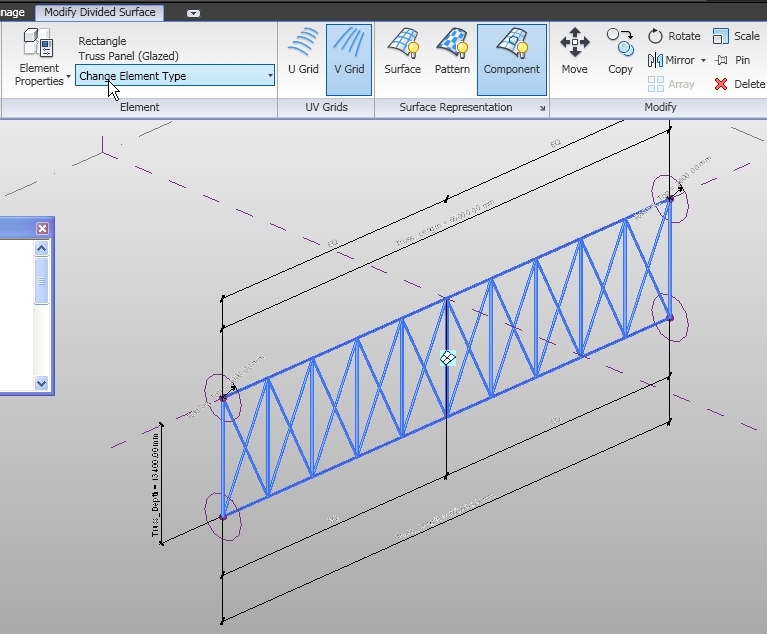
Next i started a truss form in the conceptual mass editor using a simple rig.  I created reference lines to become the top and bottom of the truss, with circles hosted on reference points at the ends to control the bar diameter.  Then i hit the Create Form button to create a surface between the lines.


Next comes the fun part.  I divide this created surface and turn OFF the U Divisions.  Obviously, I can now change the number of divisions to my hearts content (which is what i wanted in the first place!)
I'll apply the pattern I created earlier and it looks like this, not quite what i am after visually...


Remember that i said the visibility of all forms in the Panel Pattern were controlled individually?  By picking panels individually, I control the bar locations and direction.  I can also eliminate duplicates later on if i want to schedule the elements.


So now i have a parameter driven simple truss.  All the bar sizes can be controlled easily.  Also I can change the number of panel divisions to make it larger or smaller, but when i do that, the bar visibility that i set up goes pear-shaped.  But like I said, with a bit of planning, I can get around this in my project by setting up multiple families and using design options.


You can dowload this example here:


Monday, September 13, 2010

2D Stair Design in REVIT?!?!?! Huh?

Maybe this is a step backwards.

Maybe i just don't understand the program well enough.

I am open to such daggars being thrown.

Sometimes i have to deal with some pretty tight stairways...and sometimes i have to do scissor stairs...and quite frankly, I haven't found REVIT to be too good with the trial and error this process can sometimes involve.

Maybe I'm wrong.  Maybe i'll learn some new tricks at AU this year.  But for the time being, I need a solution, i know a thing or two about making useful families.

So i made this stupid 2D stair design tool (download links at the bottom of this post). 

Its driven by the height of the stair and the number of steps to determine riser height.  There is also a thick red line to show head clearance. Once i have the whole thing laid out properly, inserting the REVIT Stair objects is a snap by using the ALIGN tool.


First i make the individual STEP unit


These are the parameters for the STEP unit.  I used shared parameters for everything.  Even though the Height Clearance parameter has nothing to with this family, I pull the information back to this object so the tag works properly.


Then i put all these together into a flight.  There are some conditional On/Off parameters, the logic of which will be discussed in the FUZZY MATH course at AU this year.


These are the parameters for the flight.  Its all pretty basic really.


Then i bring it into a project and BANG, i can monkey around with a stair pretty quick and easy.


BTW, I did this in 2010 and boy did that suck.  I really gotta a get an update to 2011 on my PC....Just waiting for the realease that runs native on a MAC and then i'll replace the whole kit and kaboodle...i hope i ain't gotta wait too long....

Here is the family in a project.  If you are reading this, you already know how to get the family out there and into your library.  Enjoy!

Stair Tool.rvt

Friday, August 27, 2010

Can BIM be 'Taught'?

Do you ever stop and ask yourself how you got ‘Here’?  Not in the existential sense (i.e. of the origins of life), nor in the explicit sense of reading this blog, but rather ‘How did I become a BIM-Guy/Gal?’

Some of us come from an architectural background, some an engineering, some computer science.  My mentor was an older guy who had already had a career as a dry-wall contractor and went back to school to get a Technical Degree in CAD and he just went up and onwards from there.

My background is in architecture.  I had done design work in 3D at an Architecture firm for many years.  One day the phone rang, and my mentor said “I have work and you are the guy to do it.  When can you start?”  In 2 weeks I was working for a construction company, building a model of an arena in Architectural Desktop.  I didn’t know what ‘BIM’ was, all I knew was that they had given me a substantial pay increase to engage in the same kind of activity I had been doing all along, but now it had a fancy name!  I have bounced around between design, construction and engineering ever since.

My point is that I didn’t go to school specifically for whatever this is I do now.  On my company business card it says “BIM Coordinator”.  In the past I have been called “3D Specialist”, “Design Phase Coordinator”, but my favorite was “3D Maven”  I consider myself an architect with exceptional skills at manipulating software, and lots of experience in using 3D as a design tool through all phases of construction.  If anyone dared call me a “CAD Manager”, they wouldn’t have a chance to say it twice.

I imagine that if you are reading this, you are also a person with a diverse educational/career background.  What it says on your business card and the actual value you bring to your position are probably quite different.  What ties us together isn’t limited to just software proficiency or intellectual curiosity or design creativity or a love for Star Wars…I think there is something unquantifiable that under-girds it all.  Dare I call it ‘Passion’?

So if we take a moment to consider ‘How did we get here?’ I have been thinking that the next question might be ‘How do I bring others?’

Which brings me to the spark for this missive in the first place:

Can BIM be taught?

How is BIM being addressed conceptually in schools?  For that matter, is there a ‘Theory’ behind what we are doing?  I know there are many PHD’s out there studying the quantifiable effects of BIM, but that’s not what I am referring to at all.

In an institutional setting what would a BIM course or curriculum look like?

(I wonder if Carl Bass is reading this and thinking to himself “It looks like AU!”) 

A quick search online yeilds some interesting results...

They are teaching BIM in Texas High Schools:

An online BIM University with zero class offerings:

The USC School of Architecture does an annual Symposium, as do several other colleges I imagine:
USC BIM Symposium

They even offered one with a great name:
USC's "KILL BIM"

But really the offerings are kind of slim.

Along my journey, I’ve met some younger people who I have mentored and tutored along this path, but finding someone who shares “The Passion” is not easy.  I think that's the crux of the matter.  No matter what happens, "Passion" can't be taught...its gotta come from within...its gotta be inspired.

Does anyone else think about this at all?  I am confident someone else reading this has.

It’s not just training someone to use Revit/ADT/Rhino/Catia/Bentley, but coaching them to see the possibilities our tools bring to the table.  How do we inspire passion and innovation for the next generation(s)?

Looking forward to any and all comments/opinions/shared experiences,

TBT

Thursday, August 19, 2010

Conquering the Last 100 Feet

It ain't Revit but this is very cool....


Sunday, July 11, 2010

Curtain Panels for Analysis Part 1

I'm an architect by training and education, but i work at an engineering firm....a BIG engineering firm....the engineering firm you call when your design is so wacky, you don't know who else to call...so i get exposed to alot of problems that need solving.

One of the problems we grapple with constantly is figuring out how to get architectural models into our analysis software.  We have a couple of different programs that we use for analysis and they all want line segments.  Not faces....not arcs....and most assuredly, NOT SPLINES!!!!

On the infrequent occasion that we get an architect who will actually share a model with us, its some big mess of nurbs and splines and faces that get me nowhere.

If Revit is supposed to be all about collaboration, how can the tool be exploited in order that the architects model can be sent downstream without adulteration?  How can we streamline the process from conceptualization to analysis?

First off, here's a curvy-sexy form, straight out of the conceptual mass editor...nothing too fancy:


And this is what it looks like in Autocad...When I export as AICS Element, it calls the element a 'BODY', exporting as Polyface Mesh gives me a mesh with millions of faces.  Neither of these elements help me at all for analysis:
 

Next, I'll apply a curtain panel using the rectangular pattern to the form: 


This is now what i get in ACAD...at first look, it isn't very helpful.  Whats up with all those diagonal lines?!?!?
ACAD Brought in all the 3d faces, but if i select all the faces and delete them, voila!  I get this, the division lines as perfect segments:
Now I can bring the form directly into analysis based completely upon the design intent, which should make everybody happy.

The point isn't that everybody whould model "this way", but rather I want to know what's the downstream potential to export from revit directly into analysis or manufacture....Stay tuned, this idea has some legs....